

Table of Contents
- 1. Overview
- 2. Typical Deployment Architecture
- 3. Root Cause
- 4. Common Symptoms
- 5. Troubleshooting Workflow
- 6. The Fix (wp-config.php)
- 7. Why This Fix Works
- 8. Related Considerations
- 9. Key Takeaways
1. Overview
When running WordPress behind a reverse proxy such as Nginx, HAProxy, Traefik, or Cloudflare (acting as TLS terminator and caching layer), the WordPress admin panel and visual tools such as the Customizer may behave inconsistently.
This occurs primarily because WordPress needs to infer whether a request is HTTPS or HTTP, and in multi-layer deployments this information can be lost or misinterpreted.
2. Typical Deployment Architecture
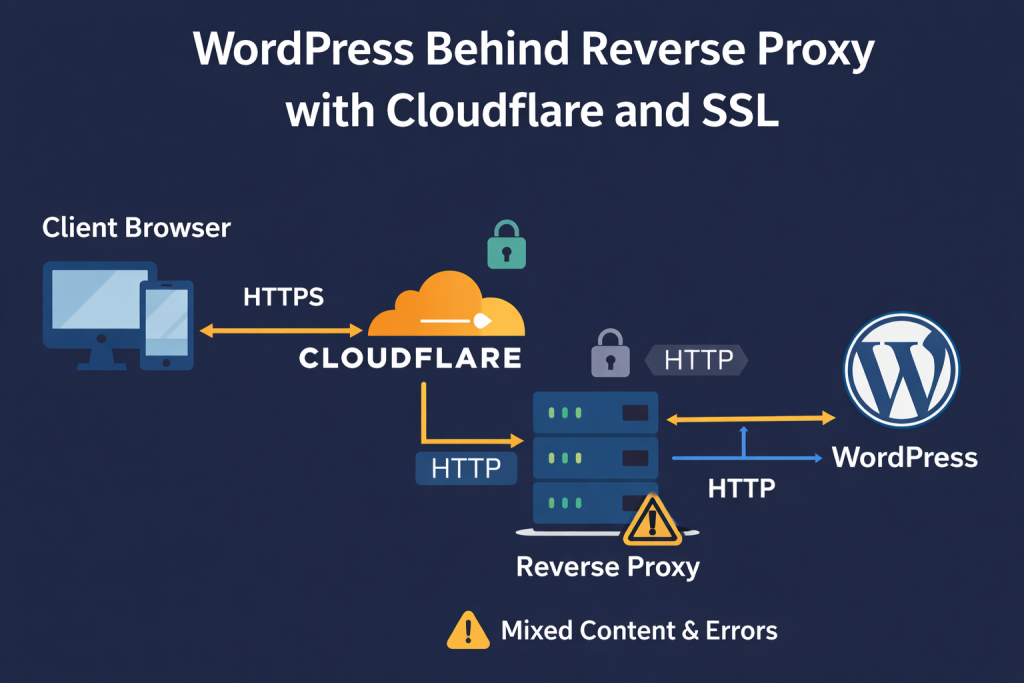
A common modern setup:
Client Browser (HTTPS)
        ↓
     Cloudflare (HTTPS)
        ↓
Reverse Proxy / Load Balancer (HTTPS → HTTP)
        ↓
     WordPress (HTTP)
In this scenario, WordPress receives requests via HTTP, even though the user sees a secure HTTPS session.
3. Root Cause
WordPress relies on:
$_SERVER['HTTPS']$_SERVER['SERVER_PORT']$_SERVER['REQUEST_SCHEME']
to determine protocol and security context.
Behind proxies, these variables often do not reflect reality.
If WordPress believes the connection is HTTP, it may:
- generate mixed content
- reject REST API calls
- fail to load Customizer frames
- fail to authenticate admin via cookie over HTTPS
4. Common Symptoms
In sites behind reverse proxies or CDNs, the following are frequently observed:
- Theme Customizer loads indefinitely (infinite spinner)
/wp-json/returns errors or is blocked- Browser console shows Mixed Content warnings
- Admin AJAX calls return
403,500orblocked - REST-based page builders fail (Elementor, Divi, Gutenberg, WPBakery)
- Authentication inconsistencies (especially in admin)
- Cloudflare reports 521/522 errors on JSON endpoints
These symptoms are often misdiagnosed as plugin or theme issues, when the cause is infrastructure-related.
5. Troubleshooting Workflow
A structured diagnostic approach typically involves:
- Verify HTTPS termination
- Where is TLS actually terminated? (CDN, load balancer, reverse, or WordPress?)
- Check forwarded headers
X-Forwarded-ProtoCF-VisitorX-Forwarded-SchemeForwarded
- Inspect mixed content in browser console
- Blocked frames
- Blocked JSON fetches
- Check
/wp-json/manually- Should return valid JSON over HTTPS
- Inspect WordPress URL configuration
WP_HOMEandWP_SITEURL
- Verify admin over SSL
FORCE_SSL_ADMIN
This distinguishes infrastructure problems from application-layer issues.
6. The Fix (wp-config.php)
A standard fix is to ensure WordPress detects HTTPS through forwarded headers:
// Proper HTTPS detection behind proxies / CDNs
if (
    (isset($_SERVER['HTTP_X_FORWARDED_PROTO']) && $_SERVER['HTTP_X_FORWARDED_PROTO'] === 'https')
    || (isset($_SERVER['HTTP_CF_VISITOR']) && strpos($_SERVER['HTTP_CF_VISITOR'], 'https') !== false)
) {
    $_SERVER['HTTPS'] = 'on';
}

define('FORCE_SSL_ADMIN', true);
Optionally enforce canonical HTTPS URLs:
define('WP_HOME', 'https://example.com');
define('WP_SITEURL', 'https://example.com');
7. Why This Fix Works
By forcing correct HTTPS detection, it restores internal consistency for:
- REST API routing
- iframe embedding (Customizer)
- cookie security flags
- mixed-content compliance
- admin authentication
This aligns what the browser sees with what WordPress thinks is happening.
8. Related Considerations
Professionally, this setup often involves:
- Kubernetes ingress controllers
- AWS ELB / ALB
- DigitalOcean Load Balancers
- Traefik / HAProxy / Nginx reverse proxies
- Cloudflare / Fastly / Akamai CDNs
- Varnish caching layers
In these environments, incorrect protocol detection becomes a frequent issue for:
- CMS platforms (WordPress, Drupal)
- Headless / REST content APIs
- Internal SaaS dashboards
- Multi-tenant control panels
9. Key Takeaways
✔ WordPress is sensitive to protocol detection
✔ Reverse proxies often hide SSL context
✔ Cloudflare adds another abstraction layer
✔ The issue is infrastructure, not theme/plugin
✔ Fixing HTTPS detection resolves REST and Customizer issues
✔ This is a recurring scenario in modern DevOps environments